Page 22 of 23
Re: Testing MrMC 3.7.1
Posted: 08 Dec 2018, 23:15
by stephenh
Montoya wrote: 08 Dec 2018, 17:49
Well, then I think something is broken now regarding resume points in MrMC, when Media Video Sources are added while "Set Content" is set to None. And nobody noticed it except Stephenh, because most off us are all using the libraries for Media Content with content set to Movies so that the library folders are scraped or are using locale nfo's for media info.
Now when a Video Source is added with content set to None, playing a video for more than 3 minutes and stopping it, backing out of content folder and going in again, DOES shows the icon that selected content is in progress, but when you want to play the content again, the content is played from the start and not from the resume point.
This is not happening when Media Video Sources are added as Movies, as we all know.
So now I am also curious where that setting is hidden in MrMC, to allow resuming of media, when Media Content of added Video source is set to None, or is this functionality broken and most of us didn't notice it ?
This is EXACTLY the behaviour I'm seeing on my system, thanks for confirming that I'm not (completely) crazy

davilla wrote: 08 Dec 2018, 15:39
It remembers, provided you have played more than 3 mins. There is also a setting for this. Resume works in both file and library modes.
I just tested again using latest 3.7.1 (181208.2021 @20181208-db2c516) TestFlight (tvOS 12.1.1) and I'm definitely not seeing the files resume or prompt to resume. I tried 2 different libraries with "No Content" set, one on my NAS and another on a DVR device (Beyonwiz U4). Waited 3 minutes and then 5 minutes just to be sure. On backing out of the file, the icon has changed to indicate partial viewing has taken place (I assume?) but playing the file again goes back to the beginning with no prompt. I do notice the file name briefly goes "blue-background" just before the picture comes up, if this means anything.
Happy to try any suggestions or assist in testing if anyone can enlighten me ...
Re: Testing MrMC 3.7.1
Posted: 08 Dec 2018, 23:28
by Montoya
davilla wrote: 08 Dec 2018, 19:55
Just re-tested, resume works fine with a video source with content set to none.
Indeed, but it doesn't work for Video Sources with Content set to None when "Default select action" in "Settings/Videos/File list" is still set at the standard value, which is "Show information", which Stephenh probably is also using.
So in that situation, MrMC should also use the resume point by just pressing the file to play with this default setting, so that the same screen pops up to resume from resume point or start from beginning.
When library content is set to None, MrMC should bypass looking for information in MrMC database or NFO and use same mechanism from Default select action=play, when pressing a file to play (when Default select action=show information is set).
I was confused myself at first, but after using a long press with "Show information" setting in "Settings/Videos/File list" to play a file, I noticed the resume point came up. So I dug deeper, concluding that the default "Show information" setting was causing this. When this setting is set to "Play", all is fine and working as it is designed.
davilla wrote: 08 Dec 2018, 21:38
Revert "plex/emby: auto play next item in the list"
Thanks, this brought the missing Emby library sort options back

stephenh wrote: 08 Dec 2018, 21:36
...can someone please kindly point me to a How-To on editing advancedsettings.xml on tvOS?
Use "File manager" in MrMC and Google it how to use it. It works the same as in Kodi (when you long press on an item you get a sub menu with actions). Create a file on your laptop/PC named advancedsettings.xml with the content Davilla posted and copy this with MrMC File manager back to your Apple TV in the profile folder and after that is done, force close MrMC and restart MrMC.
Re: Testing MrMC 3.7.1
Posted: 09 Dec 2018, 00:10
by stephenh
Montoya wrote: 08 Dec 2018, 23:28
Indeed, but it doesn't work for Video Sources with Content set to None when "Default select action" in "Settings/Videos/File list" is still set at the standard value, which is "Show information", which Stephenh probably is also using.
So in that situation, MrMC should also use the resume point by just pressing the file to play with this default setting, so that the same screen pops up to resume from resume point or start from beginning.
I was confused myself at first, but after using a long press with "Show information" setting in "Settings/Videos/File list" to play a file, I noticed the resume point came up. So I dug deeper, concluding that the default "Show information" was causing this.
When this setting is set to "Play", all is fine and working as it is designed.
Thanks, changed that setting to "Play" and now I get the behaviour I would have expected as the default but hey what would I know?
Montoya wrote: 08 Dec 2018, 23:28
Use "File manager" in MrMC and Google it how to use it. It works the same as in Kodi (when you long press on an item you get a sub menu with actions). Create a file on your laptop/PC named advancedsettings.xml with the content Davilla posted and copy this with MrMC File manager back to your Apple TV in the profile folder and after that is done, force close MrMC and restart MrMC.
Thanks for that, will certainly get familiar with all this and bring my "Resume" time down a bit ...
Thanks for all your help!
Re: Testing MrMC 3.7.1
Posted: 10 Dec 2018, 06:38
by rockerwhat
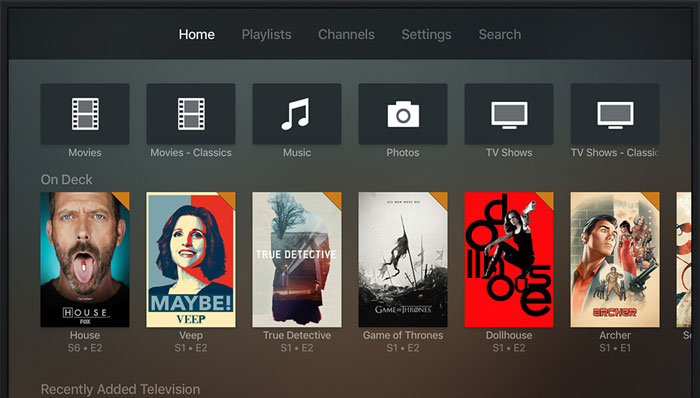
Hello, I just bought the application. I am a user of the nvidia shield tv and kodi was not working on me, so I tried your application and I loved it. I would like to know if they can do some things:
Is it possible to create a variant of the skin similar to the one shown in the image? I would even be willing to buy that skin.
Re: Testing MrMC 3.7.1
Posted: 10 Dec 2018, 14:41
by DocEagle
tvOS 12.1
Apple TV 4K
(181208.2021)
MySQL
The reported thumb problem (thumb/cover updates when changing show mode) is fixed and works correct now.
Re: Testing MrMC 3.7.1
Posted: 10 Dec 2018, 16:00
by Waltman
tvOS 12.1
Apple TV 4K
(181208.2021)
MySQL
The getting stuck / cant go home in playlist is fixed.
Re: Testing MrMC 3.7.1
Posted: 10 Dec 2018, 16:20
by amet
Thanks for confirming it!
Re: Testing MrMC 3.7.1
Posted: 10 Dec 2018, 19:41
by jabohn
stephenh wrote: 09 Dec 2018, 00:10
Thanks, changed that setting to "Play" and now I get the behaviour I would have expected as the default but hey what would I know?
Glad you were able to get it to work. It's worked that way for me for years, even when I was using Kodi/XBMC prior to MrMC and I never changed a setting.
Re: Testing MrMC 3.7.1
Posted: 12 Dec 2018, 00:51
by davilla
3.7.1 (181211.9 @20181208-ffaedaf7)
add, more iOS devices
core: vector get info to play/resume if source has media content none
proper plex/emby: auto play next item in the list
Re: Testing MrMC 3.7.1
Posted: 12 Dec 2018, 09:47
by DocEagle
tvOS 12.1
Apple TV 4K
(
181208.2021)
MySQL
In addition to my last post I can confirm that scraping of TV shows is working as expected again. Did you fix anything concerning this topic? I didn‘t find anything in the change log.